


We're thrilled to kick off another month of innovation at Leadzai!
The April Release brings 8 powerful new features and improvements crafted to sharpen your campaign intelligence, expand your operational flexibility, and streamline collaboration across your teams. Dive in to discover what's new and how these updates help you deliver even greater results for your clients.
List of new features and brief summary:
- Campaign-View Ad Controls — Pause and unpause individual ads directly from the campaign view, without navigating into each ad separately.
- PMax & Meta Placement-Level Breakdowns — Performance data for Performance Max and Meta campaigns now broken down by placement.
- Google Advertiser Reactivation — Reactivate previously cancelled Google advertisers (e.g. after payment lapse or inactivity) automatically in the platform, without duplicating the setup in the Leadzai platform.
- Enhanced Activity History Logs: Meta Linking Flow — The history log now tracks Meta linking flow interactions at campaign level, including the permissions email sent to the SMB, timestamp, and destination address.
- PMax Improvements: Vertical Images & Audience Interests — PMax campaigns now suggest vertical image formats for broader placement coverage.
- REST API: Paginated Advertiser & Campaign Endpoints — Two new paginated endpoints for listing advertisers and campaigns, enabling more efficient data retrieval for large account portfolios.
- Content Localization - Callout extensions now consider language and country relevance.
- UX/UI Improvements
- History Log: keyword changes are now displayed more clearly.
- History Log: non-staff user actions now show the user's email address for better visibility.
Sneak Peek for May 2026
- PMax continuous evolution
- Video Ads - Add the possibility for the partner to link a PMax campaign with an existing YouTube video.
- Exclude some less conversion-focus placements to improve campaign performance effectiveness (like ads in games).
- Lead Tracking: Ability to track ChatBot conversations
- Google Business Profile
- Ability to manage Location Extensions with GBP in the Platform UI.
- Periodic synchronization for when a new GBP is added to the partner portfolio.
Please find more detail per update below.
Product Release Notes - April 2026
All features available since April 27th, 2026
1. Campaign-view Ad Controls: Pause and unpause ads directly at Campaign view
Available: April 6, 2026 | Campaign Level — Ad Management
1. What is this and who is it for?
This feature is for service and support teams who need to quickly control which ads are running within a campaign. It allows pausing and reactivating individual
ads directly at campaign level, streamlining day-to-day ad management without modifying the overall campaign structure.
2. What changed, where will users see it and how does it work?
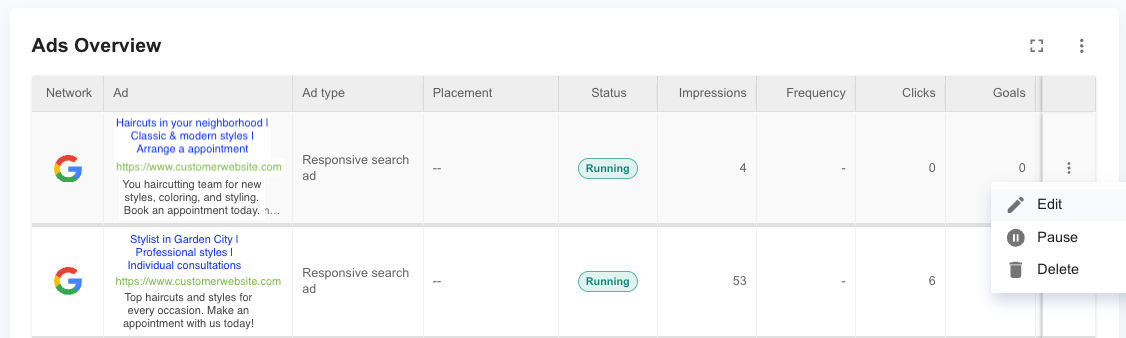
A new pause/unpause toggle is available for each ad in the Ads Overview report table. Users can control ad status directly from the campaign view rather than navigating into individual ad settings.
Paused ads stop serving across all networks (Google, Microsoft, Meta) where they are active. Unpausing restores the ad to its previous serving state. Note: We cannot guarantee the same performance as the campaign usually gets optimized over time according to new search trends.
The activities of pausing or unpausing campaigns are now also logged in the Activity History (see Feature 1).
3. How does this impact existing campaigns or setups?
No impact on running campaigns. Existing ad statuses remain as-is until a user explicitly toggles pause or unpause. Pausing an ad does not affect the campaign’s budget allocation — Leadzai’s optimization will redistribute spend across remaining active ads.
Important: As noted in the platform guidance, we generally do not recommend partners modify campaign structure. Ad pausing is intended for quick operational control (e.g. pausing an ad with outdated content), not as a substitute for optimization. For structural changes, reach out to your Partner Manager.
4. How do users get access and where is it available?
Available from April 6, 2026 in the campaign management view. The controls appear automatically for all user roles with campaign edit permissions.
2. Performance Max & Meta Placement-level Breakdowns
Available: April 13, 2026 | Campaign Level Reporting
1. What is this and who is it for?
These improvements are for service & sales teams, who use campaign-level and partner-level reporting to assess ad performance, share results with clients, and make optimization decisions.
2. What changed, where will users see it and how does it work?
Performance Max and Meta campaigns now show performance data broken down by placement. Users can view which placements are driving results. Meta placements include: Facebook, Messenger, Audience Network and Instagram. Google PMAX placements include: Display Network, Discover, Gmail, Google TV, Google Maps, Google Search, Google Search Partners and Youtube. Visible in campaign-level reporting in the ads overview table.
3. How does this impact existing campaigns or setups?
No impact on existing campaign setups. Existing reports will automatically display the new data points where available. Placement breakdown data applies to active PMax and Meta campaigns. Conversion metrics require conversion tracking to be installed on the client’s website (via the GTM code toggle in campaign setup).
4. How do users get access and where is it available?
Available from April 13, 2026. All three improvements are enabled by default in the Leadzai UI — no activation or configuration required. Also available via REST APIs.


3. Google Advertiser Reactivation
Available: April 13, 2026 | Campaign Level — Ad Groups & Keywords Step
1. What is this and who is it for?
This feature is for service and support teams managing advertiser accounts that were previously cancelled in Google. It enables reactivation without duplicating the entire advertiser and campaign setup in the Leadzai platform. This functionality will replicate the same process currently available for Meta campaigns.
2. What changed, where will users see it and how does it work?
A new reactivation option is available at advertiser level for accounts with cancelled network connections. The advertiser and thus the campaigns associated with the cancelled network are recoverable for up to approximately one year after cancellation.
This new workflow preserves the original advertiser’s history, campaign structure, and reporting data.
Note: This is separate from the existing functionality of deactivating campaigns. Deactivation is a deliberate action by the partner; reactivation addresses involuntary cancellations by the network.
3. How does this impact existing campaigns or setups?
No impact on currently active advertisers or campaigns. The original cancelled advertiser’s data and campaign history are preserved upon reactivation.
4. How do users get access and where is it available?
Available from April 13, 2026 at advertiser level. No partner-level activation required.
4. Enhanced Activity History Logs: Track Meta Linking Flow
Available: April 27, 2026 | Campaign Level Analytics
1. What is this and who is it for?
This update is for campaign managers and service teams who oversee the Meta network connection process. It adds transparency to the Meta permissions linking flow by recording whether the permission email has been sent, to whom, and by which user — closing a visibility gap that previously made it difficult to verify or troubleshoot linking requests.
2. What changed, where will users see it and how does it work?
The Meta linking flow action is now tracked in the History tab at campaign level. When a permissions email is dispatched to the SMB’s Meta account, the log records:
- Campaign ID associated with the linking request
- Timestamp of when the email was sent
- Destination email address the request was sent to
- User who triggered the action
This information is also visible within the ad’s Facebook page selection section. All log entries are visible to all user roles.
3. How does this impact existing campaigns or setups?
No impact on campaign performance or settings. This is a transparency and audit tool only. It provides proof of dispatch and helps identify delivery issues — for example, if a recipient claims the email was not received or if a typo was made in the SMB’s email address.
4. How do users get access and where is it available?
Available from April 27, 2026 in the Leadzai UI. No activation required.
5. PMax Improvement: Vertical Images
Available: May 1, 2026 | Campaign Level — Ad Groups & Keywords / Ads
1. What is this and who is it for?
This update is for service teams creating Performance Max campaigns. They improve PMax campaign quality at the content: vertical image format suggestions expand ad placement coverage improving the Ad score and making it better scored in the network increasing the chances to be presented (impressions).
2. What changed, where will users see it and how does it work?
Vertical Image Suggestions
PMax campaigns now automatically suggest vertical image formats during the content generation step. Vertical images improve coverage across Google’s vertical placements such as Discovery, YouTube Shorts, and Display. These appear alongside existing image suggestions in the Ad Groups & Keywords step.
3. How does this impact existing campaigns or setups?
No impact on existing PMax campaigns. These improvements apply only to newly created campaigns or when campaign content is regenerated. Existing PMax campaigns retain their current creative assets.
4. How do users get access and where is it available?
Available from May 1, 2026. The update will apply automatically during PMax campaign creation or content regeneration. No activation required.
6. REST API Update: Paginated Advertiser & Campaign Endpoints
Available: April 27, 2026 | API — Platform Level
1. What is this and who is it for?
This update is for partners and technical teams managing large account portfolios via the Leadzai REST API. Two new paginated endpoints make it significantly more efficient to retrieve and process large lists of advertisers and campaigns programmatically — particularly relevant for teams operating at scale.
2. What changed, where will users see it and how does it work?
Two new paginated endpoints have been added to the Leadzai REST API:
- GET /advertisers — returns a paginated list of all advertisers
- GET /campaigns — returns a paginated list of all campaigns
Both endpoints support standard pagination parameters (page size, offset/cursor), allowing teams to retrieve and process large data sets in manageable batches without hitting timeout or memory limits. Full documentation is available in the Leadzai API reference.
3. How does this impact existing campaigns or setups?
No impact on existing API integrations, campaigns, or platform settings. All existing endpoints remain available and unchanged. Partners currently using non-paginated approaches for large data retrieval are encouraged to migrate to the new endpoints for improved performance and reliability.
4. How do users get access and where is it available?
Available from April 27th, 2026. API documentation for the new endpoints is published in the Leadzai API reference. No platform-level activation required.
7. Content Localization - Start Using Country when Generating Callout Extensions
Available: April 27 2026 | Campaign Level — Ad Groups & Keywords / Ads
1. What is this and who is it for?
This improvement is for service teams creating campaigns in the unified multi-channel campaign creation flow. During the Campaign Generation, AI-generated callouts now factor in the campaign’s language and country, producing more locally relevant suggestions.
2. What changed, where will users see it and how does it work?
When generating content automatically, the system now uses the language and country defined for better localized text. For example, a plumber in Canada using French will now see callouts text that include location-relevant terms rather than generic service keywords.
The content generation process remains the same — the system scans the client’s website, identifies relevant services/products, and now additionally cross-references the language and country.
3. How does this impact existing campaigns or setups?
Existing callouts sets on live campaigns remain unchanged. The improvement applies only to newly generated keywords during campaign creation or when content is regenerated. Previously generated keywords are not retroactively modified.
4. How do users get access and where is it available?
Available from April 27, 2026 in the campaign creation flow. This location-aware generation is also applicable when using the REST API endpoints to generate campaign content.
8. UX / UI Improvements
Available: April 1, 2026 | Campaign Level Analytics
1. What is this and who is it for?
These updates improve the readability and traceability of the History Log on campaign level. Account Managers can now more easily track keyword changes and identify which users performed actions across their campaigns.
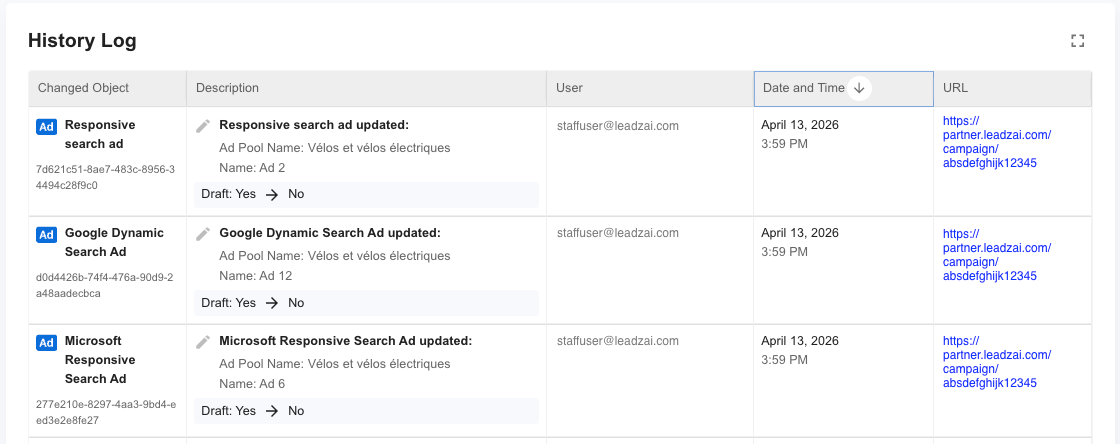
- The History Log now displays keyword changes in a clearer, more readable format.
- Actions taken by non-staff users now show the associated email address in the History Log, improving transparency and accountability.
2. How do users get access and where is it available?
Available from April 1, 2026 at advertiser level. No partner-level activation required.
Questions or feedback? Reach out to your dedicated Partner Manager.
As always, thank you for being part of the Leadzai partner community. We're committed to building features that help you and your clients succeed — and your input helps shape what comes next. Have questions or thoughts on this release? Don't hesitate to get in touch with your Partner Manager. We're all ears!