

.jpg)
We're thrilled to kick off another month of innovation at Leadzai!
The May Release is focused on making campaign management smarter, faster, and easier at scale.
We are introducing enhancements across three areas: smarter campaign optimization and delivery, a more intuitive platform experience that simplifies everyday workflows, and two new integrations that expand what your clients can track and display — including Google Business Profile and chatbot lead capture from Cliengo and Luna.
List of new features and brief summary:
- Chatbot Lead Tracking - Our tracking system now supports lead conversion tracking from Cliengo and Luna chatbot solutions, bringing chatbot-generated leads and contextual conversion data into your standard reporting alongside all other conversion sources.
- Campaign Optimization Improvements - Campaigns now exclude low-converting placements such as in-game ads, improving lead quality. Ad copy suggestions have also been updated to prioritize locations configured in the campaign rather than auto-discovered ones — giving you more control over local relevance.
- PMAX Campaign Management - PMax Search Themes now align with Google's word limits and include validation for special characters, preventing publishing errors. Vertical image formats are fully supported and surfaced through engine suggestions, helping campaigns reach more placements.
- UX & Workflow Improvements - Six interface updates that make day-to-day campaign management faster: add negative keywords directly from the search terms page, instant keyword refresh on new Ad Groups, redesigned Ad Group actions, conversions now visible in the Ads Overview table, clearer pause/unpause labels, and unique ad names for easier troubleshooting.
- Google Business Profile Integration - Users can now manually link Google Business Profile locations within Leadzai. Connected campaigns display business addresses, maps, and directions across Search, Display, PMax, and Google Maps.
Sneak Peek for June 2026
- Pmax Advancements - Video Ads - Add the possibility for the partner to link a PMax campaign with an existing YouTube video.
- New Metrics - Meta Reach to identify clearly how many unique users the Ad is shown & Google Optiscore to present the completeness of the campaign scope in Google.
- Plugin for Duda Websites - Easily install Leadzai's tracking solution using a Duda Plugin.
- Google Business Profile: Automatic Sync - Periodic synchronization for when a new GBP is added to the partner's portfolio.
Please find more detail per update below.
Product Release Notes - May 2026
All features available since May 28th, 2026
1. Campaign Optimization Improvements
Available: May 26, 2026 | Campaign Level — Optimization & Content Relevance
1. What is this and who is it for?
Two targeted improvements for teams focused on lead quality and campaign relevance.
The first reduces spend on low-converting placements.
The second makes ad copy suggestions more aligned with how the campaign is actually configured.
2. What changed, where will users see it and how does it work?
Leadzai now excludes placements that are typically less conversion-focused — such as ads shown inside games — so campaigns are focused on environments with stronger performance potential.
Ad Copy Suggestions are now based on the locations configured in the campaign, rather than relying exclusively on locations automatically discovered by the platform. This keeps suggestions aligned with the advertiser's intended targeting and business context.
3. How does this impact existing campaigns or setups?
Existing advertisers benefit automatically from the placement optimization improvements, with no required action from users.
For Ad Copy Suggestions, users will see more relevant and location-aware recommendations when creating or optimizing campaign content. This does not modify existing ad copy automatically; users remain in control of whether to apply suggested changes.
4. How do users get access and where is it available?
These improvements are available automatically in the campaign optimization flow and ad copy suggestion experience. No additional setup is required.
2. PMAX Campaign Management
Available: May 25, 2026 | Validations & Image Quality
1. What is this and who is it for?
This update is for teams creating, managing, and publishing PMax campaigns through the Leadzai platform. It improves the campaign setup and management experience by reducing publishing errors, supporting richer creative formats, and helping campaigns reach broader placement coverage.
2. What changed, where will users see it and how does it work?
The integration with Search Themes was improved to better match Google’s expected word limits. A new validation for special characters was also added to prevent errors when publishing campaigns.
Vertical images are now supported directly in the campaign interface. These formats are suggested by Leadzai’s engine to help increase placement coverage and allow the campaign scope to be set to high.
3. How does this impact existing campaigns or setups?
Existing campaigns are not negatively affected. The improvements help users avoid publishing errors when configuring PMax campaigns and make it easier to manage vertical image assets directly from the platform.
Campaigns using suggested vertical images will benefit from broader placement eligibility and improved creative coverage across Google inventory.
4. How do users get access and where is it available?
These improvements are available automatically in the PMax campaign setup and management experience. No additional setup is required.
3. UX & Workflow Improvements
Available: May 25, 2026 | Campaign Level — Workflow & Usability
1. What is this and who is it for?
For service teams managing campaigns day-to-day. Six usability improvements that reduce the number of steps needed to act on performance data and manage ads across multiple ad groups.
2. What changed, where will users see it and how does it work?
- Negative keywords from search terms page — users can now add negatives directly from the search terms statistics view, without navigating away.
- Instant keyword refresh — keywords update immediately when a new Ad Group is created.
- Redesigned Ad Group actions — collapsible actions were revamped for faster navigation across multiple Ad Groups.
- Conversions in Ads Overview — conversion data is now visible directly in the Ads Overview table.
- Clearer pause/unpause labels — action labels were rewritten to reduce ambiguity.
- Ad naming/designation — each ad now carries a clear label, making it easier to connect performance data or network flags to the exact ad.
3. How does this impact existing campaigns or setups?
No impact on campaign delivery or settings. All changes are interface-level.
4. How do users get access and where is it available?
Live across campaign management, search terms, Ad Groups, and Ads Overview from May 25. No setup required.
4. Google Business Profile Integration
Available: May 25, 2026 | Campaign Level — Location Extension Management
1. What is this and who is it for?
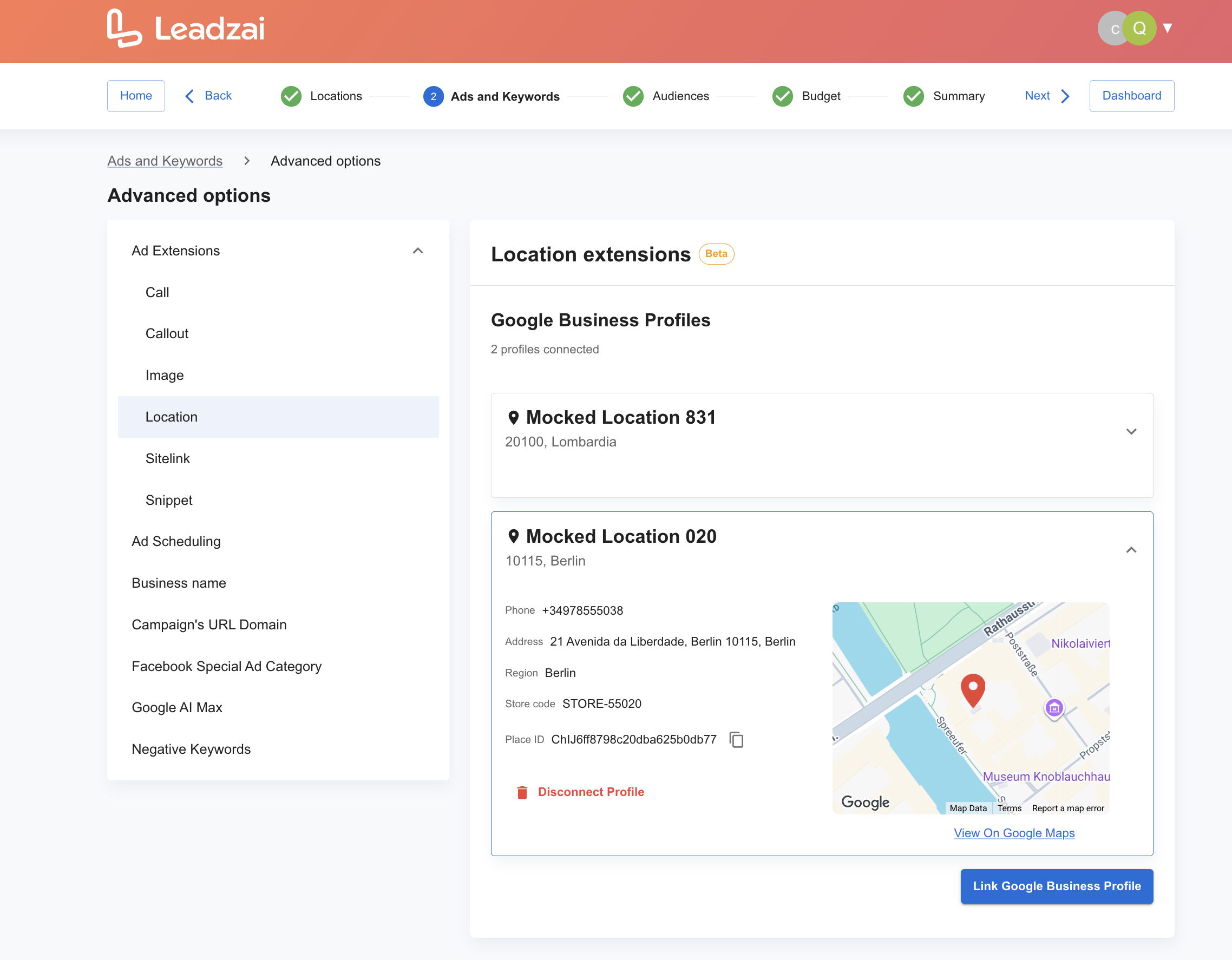
For teams running campaigns for businesses with physical locations. Users can now link and manage Google Business Profile location extensions directly in Leadzai — no need to manage this separately in Google Ads.
2. What changed, where will users see it and how does it work?
For teams running campaigns for businesses with physical locations. Users can now link and manage Google Business Profile location extensions directly in Leadzai — no need to manage this separately in Google Ads.
3. How does this impact existing campaigns or setups?
Existing campaigns are not affected unless a user manually links a Google Business Profile.
For campaigns with a connected profile, location extensions can improve local visibility and make ads more useful for customers searching for nearby businesses or directions.
4. How do users get access and where is it available?
To enable this feature, contact your Partner Manager to get started. Once you grant Leadzai access to your Google Business Profiles portfolio, your users can browse and select the relevant GBP directly within the platform — either when setting up a campaign or from the Advertiser view — under Advanced Options > Ad Extensions > Location Extensions. Upon selection, the GBP is linked to the campaign and the Location Extension is activated automatically.
You must activate this feature access in the Beta Features, namely “Business advanced options”.
Early June it will become the default configuration in the platform.
5. Chatbot Lead Tracking
Available: May 28, 2026 | Campaign Level — Conversions & Lead Tracking
1. What is this and who is it for?
This update is for teams tracking lead generation performance across campaign touchpoints. Leadzai can now capture conversions from chatbot interactions, closing the gap for advertisers who use chat as a primary lead capture tool.
2. What changed, where will users see it and how does it work?
Leadzai can now track lead conversions from Cliengo and Luna chatbot solutions.
When a chatbot interaction results in a lead, the conversion and its contextual data appear in the platform alongside all other tracked lead sources — giving a complete view of what each campaign is generating.
3. How does this impact existing campaigns or setups?
No impact because this gets added to the tracking script automatically so your website benefits from it without any change required. For advertisers using Cliengo or Luna, this fills a gap in attribution that previously left chatbot leads untracked and unreported.
4. How do users get access and where is it available?
Available from May 28 for advertisers using Cliengo or Luna. The chatbot tracking integration needs to be configured per advertiser. Contact your Partner Manager to set this up. If you have other chatbot solutions that would be interesting to integrate - please contact us!
Questions or feedback? Reach out to your dedicated Partner Manager.
Thank you for being part of the Leadzai partner community. We remain committed to developing features that help you and your clients achieve better results, and your feedback helps guide the way. If you have any questions about this release, your Partner Manager is always just a message away!