

List of new Features:
- Lead & Conversion Report Exports
- New Language Support: Swedish
- New Areas of Interest for Meta Audience Targeting
- Improvement of Content Quality
- Zero Clicks Filter
Please find more details below:
1. Lead & Conversion Report Exports
When can it be used? → March 1, 2026
Where does it live? → Platform User Settings & Campaign Creation
What is this and who is it for?
Last month, we released Conversion and Detailed Leads data at the Campaign Analytics level to enhance the value of your customer reporting. This feature is available for campaigns with tracking installed.
You can now also export Lead and Conversion reports. The supported export formats include .csv and .pdf.
This update allows your teams to easily share relevant data subsets with clients.
What changed, where will users see it and how does it work?
This will be visible in the UI for all campaigns with tracking installed. Please find instructions on how to activate tracking here. Once the tracking has been approved and activated, conversions and leads will be showing on campaign level reporting. Check our last release for more information on what type of conversions and leads are being tracked.
How does this impact existing campaigns or setups?
Existing campaigns, as well as any new campaigns with tracking, now have an export button in their conversion/leads reporting.
How do users get access and where is it available?
- This will automatically be visible as default for all campaigns with tracking
- This is API available
2. New Language Support: Swedish
When can it be used? → March 1, 2026
Where does it live? → Platform User Settings & Campaign Creation
What is this and who is it for?
In Leadzai, you can select your preferred language in two separate areas: content generation and the platform UI.
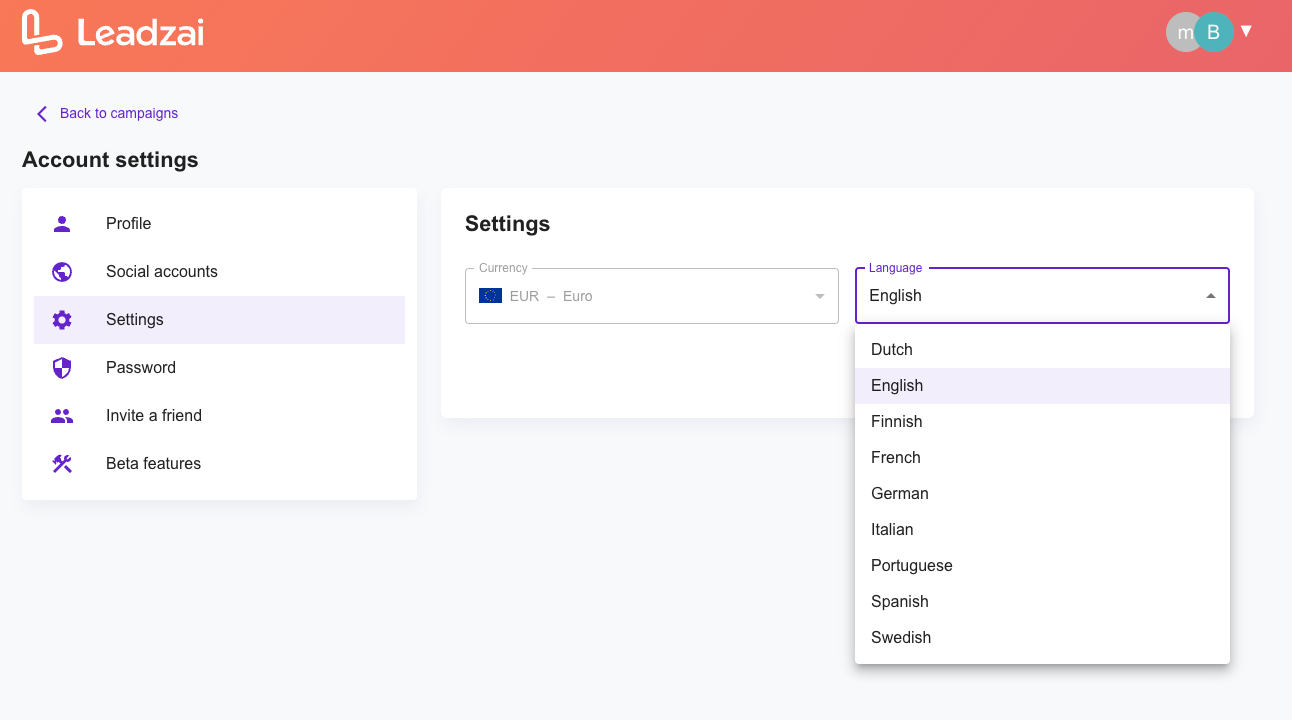
We’ve recently added Swedish to our platform UI options. This means the entire Leadzai interface — across all features and previews — will adapt to the language you choose. This will allow our local partner teams to work more efficiently in their native language. The full list of languages we now support can be found here.
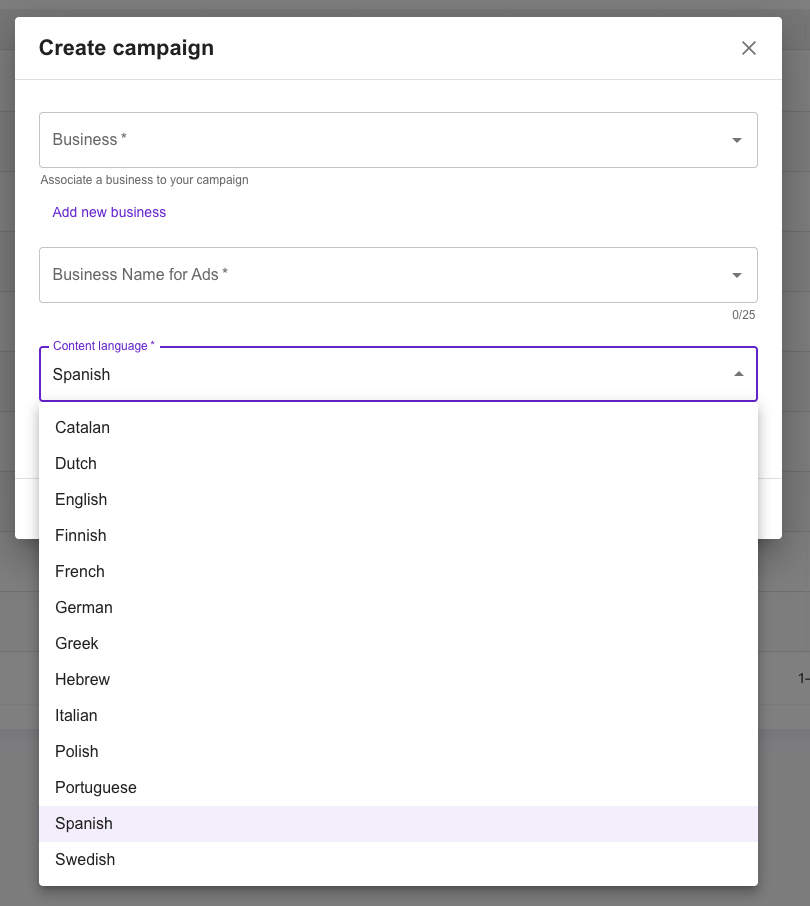
You can now also generate campaign content in Swedish. For content generation we support the following languages.
What changed, where will users see it and how does it work?
The platform language can be set on user level for all users with access. This preference can be changed at any time.
If individual users prefer a different language, they can update it by going to the top-right menu > Account Settings > Settings > Set Language.
To create campaign content in Swedish, simply select Swedish from the “Content Language” dropdown when setting up a new campaign.
How does this impact existing campaigns or setups?
For the Platform UI language settings:
If the default language is changed at the partner level, it will automatically apply to all existing and new users.
Individual users can update their preferred language at any time, and the Platform UI will instantly reflect their selection.
If you come across any incorrect translations or unusual terminology, please let us know.
How do users get access and where is it available?
- If you want to change your default language for all users, please reach out to your partner account manager.
- Otherwise users will find language settings in the UI as mentioned above.
- Content generation in Swedish is also available via API
3. New Areas of Interest for Meta Audience Targeting
When can it be used? → March 1, 2026
Where does it live? → Campaign Creation & Optimization
What is this and who is it for?
We’ve enhanced Meta Areas of Interest to improve ad targeting by enabling more precise Meta audience interests and hobbies.
What changed, where will users see it and how does it work?
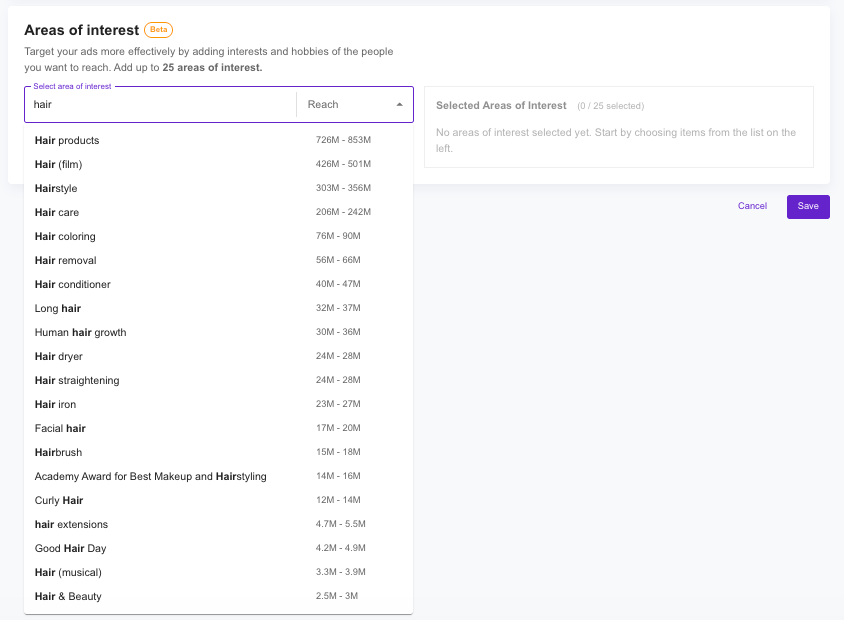
This update delivers both backend and frontend enhancements. A new section has been added to the Audience Targeting step within the campaign creation flow, allowing users to adjust their selected audience either before or after launch.
The feature will transition from Beta to general availability. When you enter an Area of Interest, a dropdown menu will display related Areas of Interest along with their estimated reach.
How does this impact existing campaigns or setups?
This update applies to both existing and new campaigns. All existing campaigns with legacy Areas of Interest will be automatically migrated to the new audience targeting system to ensure a seamless transition.
How do users get access and where is it available?
- On by default
- API behavior has not changed. Custom Areas of Interest cannot be submitted or modified via the API. However, you can automatically generate campaigns that include Areas of Interest.
4. Improvement of Content Quality
When can it be used? → March 1st 2026
Where does it live? → Campaign Creation Stage
General Enhancements
- The platform now adapts content to the dialect of the target country.
- Communication aligns with the advertiser’s website tone, vocabulary, and phrasing.
German-Specific Enhancements
- Refined the prompt and selected the most suitable LLM for improved results.
What is this and who is it for?
We’ve enhanced Auto Content Generation to make it more attuned to its local environment.
For German specifically, a new LLM version has been fine-tuned based on iterative feedback cycles, resulting in improved output quality.
What changed, where will users see it and how does it work?
This update introduces backend enhancements that enable the platform to leverage the target country’s dialect, resulting in more localized and contextually relevant content.
In addition, the feature adopts the advertiser’s website tone, vocabulary, and phrasing to closely mirror the brand’s communication style—ensuring the generated content aligns as closely as possible with what users would find on the actual website.
How does this impact existing campaigns or setups?
This update applies to all newly generated content. Existing campaigns will also benefit whenever new auto-generated content is requested.
How do users get access and where is it available?
- On by default
5. Zero Clicks Filter
When can it be used? → Start Date
Where does it live? → Campaign (Ad) Creation Stage
- Filter out Archived and Cancelled campaigns
- Filter out Learning Stage
What is this and who is it for?
In Leadzai’s Campaign Pulse Check report, we include a report that highlights campaigns with zero clicks. This report now features a more accurate campaign list to better support prioritization and optimization efforts.
While campaign optimization is typically handled by our teams, we share this report to ensure full transparency with our partners.
What changed, where will users see it and how does it work?
Previously, the report displayed all Zero Click campaigns. It now automatically excludes Archived and Cancelled campaigns, as well as campaigns in the Learning Stage.
These filters are applied by default, and no action is required from the Partner Service side.
How does this impact existing campaigns or setups?
This will be reflected in the campaign reports in real time, with updates applied immediately.
How do users get access and where is it available?
- On by default
- Not available via API
SNEAK PEEK of what's coming in March 2026:
- Additional History Logs: Track platform activity for Keyword, Location, and Ad adjustments.
- Swiss Standard German Support: Content generation now available in Swiss Standard German.
- PMax & Meta Reporting: Breakdown by placement for Impressions, Clicks, and Conversion metrics.
Thank you for being a valued partner. We’re excited to continue building tools that help you drive better results with Leadzai. If you have any questions or feedback on these new features, please reach out to your Partner Manager — we’d love to hear from you!